

Gain lifetime access to structured STEM lessons, PDFs, textbook walkthroughs, and long-form college mathematics training through:
theSTEMmajor.com
PLEMacademy.com
Payhip Crash Course Bundle
Over 1,000+ mathematics, physics, engineering, and proof-writing lessons are available for members.
How to Type Mathematics Professionally in Microsoft Word
This lesson explains how to write mathematics professionally in Microsoft Word using the built-in equation editor, Math Print formatting, and efficient document organization techniques for STEM majors.
Many students immediately jump into LaTeX typesetting software without first understanding that Microsoft Word is already an extremely powerful mathematical writing tool. For engineering reports, physics homework, textbook notes, tutoring documents, and professional workplace communication, Microsoft Word is often significantly faster and more practical.
Setting Up Microsoft Word Properly
The first step is organizing Word for mathematical typing efficiency. The lesson recommends:
- Using Cambria Math as the equation font.
- Using a clean readable font size such as 13pt.
- Creating a custom keyboard shortcut for equations.
- Using structured headings and formatting styles.
- Building organized textbook-like documents.
To speed up workflow, assign a keyboard shortcut such as Command + E to automatically insert equations. This allows rapid switching between writing and mathematics without interrupting thought flow.
Basic Equation Typing
Microsoft Word’s equation editor behaves similarly to LaTeX syntax while remaining easier for most students to learn.

Fractions can be typed directly using slash notation:

Radicals, exponents, matrices, summations, and Greek symbols can all be entered naturally through the equation editor.
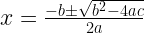


Important Word Equation Tips
One of the biggest mistakes students make is not understanding how the equation editor exits radicals, denominators, superscripts, and grouped structures.
The lesson stresses learning how to:
- Exit superscripts properly.
- Move between grouped terms.
- Use arrow keys efficiently.
- Navigate fractions and radicals.
- Keep equations visually organized.
Tables for Professional Layouts
Tables are one of the best tools for creating textbook-style layouts in Microsoft Word. After inserting a table, borders can be hidden while maintaining alignment of equations and explanations.
This allows students to create professional lecture notes, solution manuals, proof documents, and educational resources that resemble printed textbooks.
Microsoft Word vs Traditional LaTeX
Traditional LaTeX software is excellent for formal publications and advanced typesetting workflows, but it is often slower for everyday student work.
Microsoft Word is extremely valuable because:
- Most employers expect Microsoft Office experience.
- Engineering and technical workplaces use Word extensively.
- It allows rapid equation construction.
- It integrates easily with PDFs and reports.
- It simplifies communication and collaboration.
The lesson emphasizes that communication skills matter tremendously in STEM careers. A student may understand advanced mathematics, but if they cannot organize or present information professionally, they may struggle in industry environments.
Matrix and Vector Examples
Microsoft Word also handles matrices and vector notation cleanly.


Final Thoughts
The overall message of the lesson is that STEM students should not overlook Microsoft Word as a serious mathematical writing platform. Learning how to communicate mathematics clearly is just as important as learning how to solve equations.
Clean formatting, organized structure, professional presentation, and efficient workflow development are essential skills for mathematics, physics, engineering, and technical careers.
Learn calculus, differential equations, proof writing, vector calculus, tensor notation, advanced physics, and mathematical communication through long-form textbook-style lessons.
Visit:
PLEMacademy.com
theSTEMmajor.com
authorjond.com
Structured lessons, PDFs, podcasts, and educational resources designed for serious STEM majors.
Share this:
- Share on Facebook (Opens in new window) Facebook
- Print (Opens in new window) Print
- Share on Threads (Opens in new window) Threads
- Share on Tumblr (Opens in new window) Tumblr
- Share on Telegram (Opens in new window) Telegram
- Share on Bluesky (Opens in new window) Bluesky
- Share on LinkedIn (Opens in new window) LinkedIn
- Share on Nextdoor (Opens in new window) Nextdoor
- Share on WhatsApp (Opens in new window) WhatsApp
- Share on Pinterest (Opens in new window) Pinterest
- Share on Mastodon (Opens in new window) Mastodon
- Email a link to a friend (Opens in new window) Email
- Share on Reddit (Opens in new window) Reddit
- Share on X (Opens in new window) X