

How to Use Microsoft Word for Math Print
This lesson explains how to type mathematics professionally in Microsoft Word using the built-in equation editor, Cambria Math, keyboard shortcuts, tables, and basic formatting tools.
The lesson compares Microsoft Word Math Print with traditional LaTeX typeset software and explains why Microsoft Word is often the more practical tool for college STEM students preparing for professional employment.
Setting Up Microsoft Word for Math Print
The first recommendation is to modify the normal style of the Word document so that the whole document uses a clean mathematical font and spacing structure.
- Open Microsoft Word.
- Modify the Normal style.
- Change the font to Cambria Math.
- Use font size 13.
- Use justified alignment.
- Remove unwanted extra paragraph spacing.
Students are also shown how to create a keyboard shortcut for inserting equations.
Tools → Customize Keyboard → Insert → Equation Insert
Jonathan uses:
Command + E
to quickly open the equation editor.
Basic Math Print Examples
Inside the equation editor, students can type expressions quickly using syntax similar to LaTeX.

The quadratic formula can be typed directly inside the equation editor:
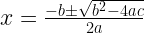
The lesson also explains the importance of using the right arrow key to move out of radicals, denominators, superscripts, and grouped equation structures.
Fraction examples include:

Using Tables for Math Layouts
Microsoft Word tables can be used to align equations, explanations, and multi-step solutions professionally.
Students are shown how to:
- Insert a table.
- Auto fit the contents.
- Auto fit the table to the window.
- Remove borders.
- Add color and layout formatting if needed.
- Use tables to organize equations and explanations.
The lesson explains that many professional looking documents can be created quickly in Microsoft Word without needing full LaTeX typesetting software.
Microsoft Word vs LaTeX Typeset Software
The lesson argues that LaTeX typeset software is useful for professional textbook design, advanced publishing workflows, and elaborate research documents, but that it often takes significantly longer than Microsoft Word for ordinary STEM coursework and technical writing.
Examples of LaTeX-style notation include:


Jonathan emphasizes that many employers expect Microsoft Office experience, written communication skills, and professional document formatting ability.
Professional Communication Skills
The lesson connects Microsoft Word skills to workplace expectations. Engineering, technical, and scientific positions often require strong written and verbal communication skills along with practical software familiarity.
The broader argument is that students should use their college coursework as an opportunity to build professional Microsoft Office experience rather than relying only on handwritten work or specialized typesetting systems.
Useful Tools for STEM Students
The lesson also mentions tools that can support technical work, including:
- Microsoft Word equation editor
- MacBook Grapher
- WolframAlpha for arithmetic verification
- Screenshots for technical documents
- Tables for aligned layouts
- Cambria Math for readable formatting
These tools can help students produce clean mathematical documents, homework solutions, technical reports, and textbook style materials.
Final Message
The lesson concludes that STEM students should learn how to type mathematics clearly, quickly, and professionally in Microsoft Word.
LaTeX has legitimate uses, but Microsoft Word is often the faster and more practical tool for students building workplace ready communication skills.
Transcript reference: :contentReference[oaicite:0]{index=0}